Description
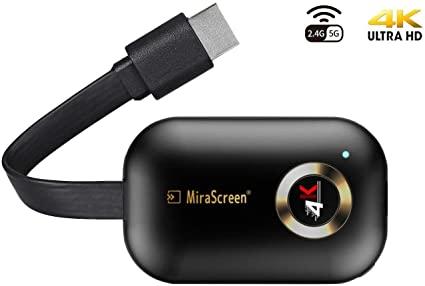
MiraScreen Wireless Display Dongle – 4K UHD, 5G Dual Band – CDE-3379
Product description
– Airplay Miracast Dongle Specification
– Chipset: AM8272
– DDR: 1Gbit
– Flash: 1Gbit
– Output: HDMI
– Power: 5V 2A
– Size: 61x39x14mm
– Weight: 23g
–
– Airplay Display Dongle Stallation
– 1. Connect wifi antenna with receiver dongle, and then onnect another plug of wifi antenna to a USB adapter
– 2. Connect the tv dongle directly into an HDTV input port on your TV
– 3. Set your TV’s Source/Input selection to HDTV input port connected to the cast dongle
– 4. The casting dongle now starts up and will display instructions on your TV screen. Follow the instructions to complete setup
–
– Wireless 2.4GHz and 5GHz Network for TV Receiver Adapter
– If the hdmi Dongle for tv supports dual WiFi band, please follow below steps to use 5GHz WiFi Band
– If MiraScreen Dongle is not connected to wireless home router, then you may switch between 2.4GHz and 5GHz by pressing the button on MiraScreen dongle
– An 5G icon will show up once MiraScreen has been switched to 5GHz wireless band
– If MiraScreen android wifi dongle is connected to wireless home router, then MiraScreen will operate at the same wireless band as the router
– MiraScreen’s WiFi SSID and Password are shown on the TV screen. You may connect your mobile phone or laptop to the MiraScreen’s WiFi SSID, and then setup MiraScreen accordingly
–
– Screen Mirror Dongle Package List
– 1 x Display Dongle Receiver
– 1 x Cable
– 1 x User Manual
Reviews
There are no reviews yet.